

Live tool: peppolverify.com
Problem
When I launched Peppol Verify, the tool answered one question: is this ABN or NZBN registered on the Peppol network? That is a Domain Name System (DNS) lookup against the Service Metadata Location (SML), and it returns two things: a yes or no, and the URL of the participant's Service Metadata Publisher (SMP).
That is enough to confirm registration, but it does not tell you much about how a participant is set up. Being registered is not the same as being able to receive the specific document you want to send them. A business might be on the network but only configured to receive invoices, not credit notes or response messages. The registration check alone cannot see that.
It is worth being clear about direction here. Peppol registration is fundamentally about receiving. A participant is registered to receive certain document types at a certain Access Point. Knowing which document types they accept, and which Access Point serves them, gives you a strong clue about their setup, and by extension whether a document you want to send them has somewhere to land. The registration check alone cannot see any of this.
The detail that answers those questions lives one step further along, in the SMP itself. So the obvious next step was to go and read it.
Solution
There is now a "Fetch additional details from SMP" toggle in Peppol Verify. With it on, each registered participant is looked up a second time, this time against their own SMP, and the results show a lot more:
- Document types — the full list of what the participant is actually configured to receive (invoice, credit note, responses, and so on)
- Access Point — the name on the certificate serving the participant's metadata
- Entity name — the registered business name, pulled from the participant's business card
One caveat on the entity name: it comes from the participant's business card, which is self-registered rather than validated against the official ABN or NZBN record. It can be outdated, abbreviated, or occasionally missing altogether, so treat it as a helpful indicator rather than an authoritative source.
With the toggle off, you get the original fast registration check: status plus SMP URL, nothing more. With it on, you get the full picture of how each participant is set up to trade.
The document types also feed into filtering. When SMP details are on, a new "By document type" filter appears alongside the existing status filter, so you can narrow a list down to, say, only the participants who can receive a credit note. That is useful when you are checking whether a group of suppliers can actually accept the document you need to send.
How it works
The two stages resolve differently, and that difference is worth understanding.
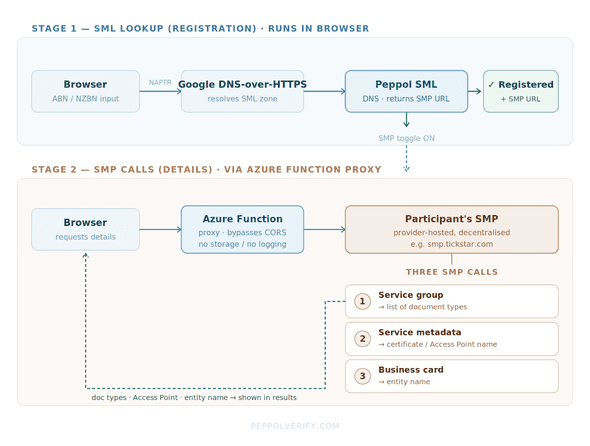
Stage 1 — the SML lookup (registration). This is a DNS NAPTR query against the Peppol SML zone, done in the browser via Google's DNS-over-HTTPS API. A NAPTR record means the participant is registered, and it points at the URL of their SMP. This is unchanged from launch and still runs entirely client-side. Because this is DNS, caching can introduce lag: a newly registered participant may show as not registered until the records propagate and any cached negative result expires.
Stage 2 — the SMP calls (details). This is where the new toggle does its work. For each registered participant, three calls are made to their SMP:
- The service group, which returns the list of document types
- The service metadata for the first document type, which returns the certificate and Access Point name
- The business card, which returns the entity name
Here is the important architectural point: these SMP calls do not run in the browser. SMPs are operated independently by service providers, and they do not send the CORS headers a browser needs to call them cross-origin. A direct browser request would be blocked before it left the page.
So the SMP calls route through a small Azure Function proxy. The browser asks the function, the function calls the SMP, and the response comes back. The proxy does no logging of lookups and retains no lookup history. SMP responses are cached briefly for performance. It exists purely to get around the CORS restriction that would otherwise make these reads impossible from a static site.
When to use it
Leave the toggle off when you just need a fast yes or no on registration across a list. It is quicker, and it makes no calls beyond DNS.
Turn it on when you need to know what a participant can actually receive, who their Access Point is, or the registered entity name behind an identifier, and when you want to filter a list by document type.
Try it: peppolverify.com
Disclaimer
Peppol Verify is an independent community tool built by me and is not affiliated with, endorsed by, or associated with OpenPeppol, the Australian Taxation Office, Ministry of Business, Innovation and Employment, any Australian or New Zealand Government entity, or any other official Peppol authority.
Results are provided as-is. Always verify critical information through official channels.