

Live tool: peppolverify.com
Update (July 2026): Peppol Verify now has an optional feature that fetches additional participant detail (document types, Access Point, and entity name) directly from the SMP. Because those calls can't run in the browser, they route through a lightweight Azure Function proxy, which also caches responses briefly to ease load on the providers' SMPs. The registration check described in this post is unchanged and still runs entirely browser-side. See Fetching Participant Details from the SMP for the details.
Problem
In previous posts I covered how to download the Peppol directory into Excel and how to make the country filter dynamic using Power Query parameters.
That approach worked well at the time, however the Peppol directory file contains the entire global directory, which is quite large and can be slow to work with.
What if you only want to quickly check a list of suppliers or customers? Without downloading a massive CSV, loading it into Power Query or maintaining XLOOKUP formulas.
The Peppol directory is useful, however it is not always up to date. The definitive source of truth for whether a business is on Peppol comes from a Domain Name System (DNS) lookup against the Peppol Service Metadata Locator (SML). The same mechanism your access point uses when routing invoices.
Solution
To solve this, I built a free browser-based tool with no ads or tracking that allows you to paste a list of ABNs or NZBNs and check their registration status directly against the Peppol SML.
How to use it:
-
Go to peppolverify.com
-
Select the ID Schedule or country to switch between ABNs (Australia) or NZBNs (New Zealand).
-
Paste your list of business numbers into the input area, either one per line or comma separated.
-
Click Look up and the results will appear inline for each identifier, showing:
- Registration status (registered / not registered)
- SMP URL for registered participants
-
Once the results are in, you can export to CSV or copy to clipboard to bring them back into Excel or any other workflow.
That is it.
How it works
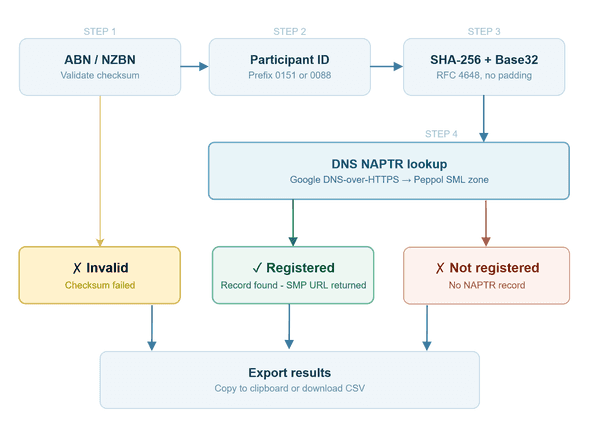
Each lookup follows the same SMP resolution process that Peppol access points use in production:
-
The identifier is normalised and validated against its respective scheme checksum algorithm.
-
A participant identifier is constructed using the ISO 6523 ICD code (
0151for ABN,0088for NZBN) -
The identifier is SHA-256 hashed and Base32 encoded (RFC 4648, no padding)
-
A DNS NAPTR lookup is performed via Google's DNS-over-HTTPS API against the Peppol SML zone
-
A NAPTR record in the response confirms the participant is registered and returns their SMP URL
This queries DNS directly, rather than the Peppol directory, the result reflects the live state of the network. A business that has just registered or deregistered will appear correctly here before the directory updates.
When to use this
This tool is most useful when:
- You are onboarding new suppliers or customers and need a bulk Peppol readiness check
- You are reviewing a supplier/customer master list to prioritise eInvoicing enablement
- You need a quick spot check without downloading the full directory
Try it: peppolverify.com
Disclaimer
Peppol Verify is an independent community tool built by me and is not affiliated with, endorsed by, or associated with OpenPeppol, the Australian Taxation Office, Ministry of Business, Innovation and Employment, any Australian or New Zealand Government entity, or any other official Peppol authority.
Results are provided as-is. Always verify critical information through official channels.